Async Code in Node.js: Callbacks and Promises

Focused on building robust web applications and understanding the underlying infrastructure of the internet.
Imagine you are running a high-end restaurant with a unique constraint: you only have one waiter. In a traditional "synchronous" restaurant, that waiter would take an order, walk to the kitchen, and stand there staring at the chef until the meal was ready. During those fifteen minutes, no other customers could be seated, no drinks could be poured, and no bills could be paid. The restaurant would be incredibly slow, regardless of how fast the chef worked.
Node.js is that restaurant, and the waiter is the Single Thread. To keep the business running, Node.js uses Asynchronous Programming. Instead of waiting for the kitchen, the waiter takes an order, hands the ticket to the chef, and immediately moves to the next table. When the food is ready, the chef rings a bell, and the waiter returns to serve the dish.
This "non-blocking" nature is what allows Node.js to handle thousands of concurrent connections on a single thread.
Why Asynchronous Code Exists in Node.js
Node.js was built for the modern web, where I/O (Input/Output) operations like reading a file from a disk, querying a database, or calling an external API are the most time-consuming tasks.
If Node.js performed these tasks synchronously, the execution of the entire program would stop until the data was returned. This is known as Blocking. In a server environment, this would mean every other user would be blocked while one person's profile picture was loading. Asynchronous code allows Node.js to offload these heavy tasks to the system's kernel, keeping the main thread free to handle new requests.
1. The Foundation: Callback-Based Execution
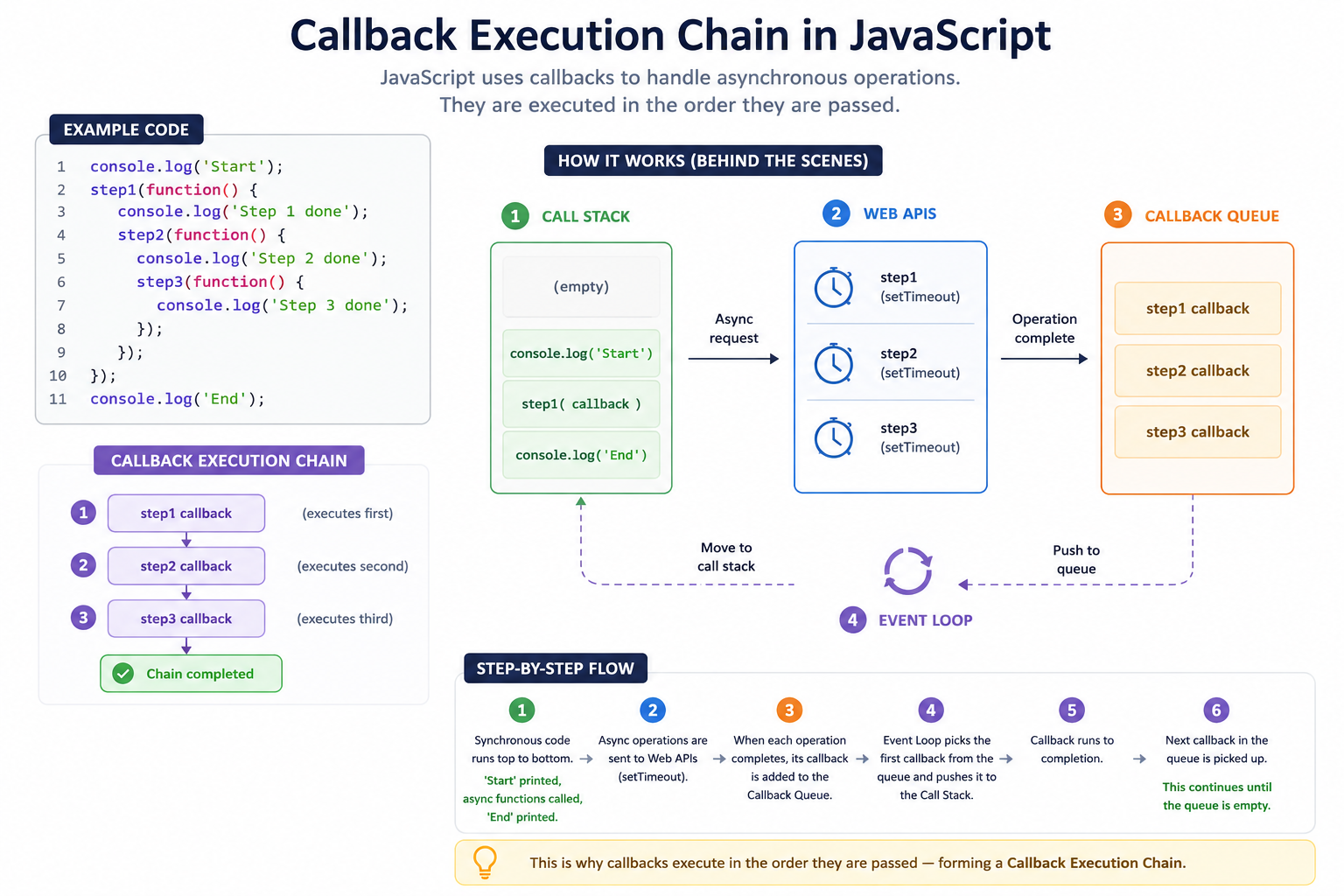
The original way Node.js handled asynchronous tasks was through Callbacks. A callback is simply a function passed as an argument to another function, which is executed once the task is complete.
In Node.js, the standard is the Error-First Callback pattern. The first argument is reserved for an error object (if something went wrong), and the second argument is for the successful data.
Example: Reading a File with Callbacks
const fs = require('fs');

console.log("1. Start reading file...");

fs.readFile('config.json', 'utf8', (err, data) => {
  if (err) {
    console.error("Error detected:", err.message);
    return;
  }
  console.log("2. File Content:", data);
});

console.log("3. Moving to next task...");
Step-by-Step Flow:
console.log("1...")runs immediately.fs.readFilestarts the process of reading from the disk. Instead of waiting, Node.js moves it to the background.console.log("3...")runs immediately after, even though the file isn't read yet.Once the disk finishes reading, the Callback Function is pushed onto the task queue and eventually executed, printing "2...".
2. The Breaking Point: The Problem with Nested Callbacks
Callbacks work perfectly for one or two tasks. However, real-world applications often require sequential tasks: "Read the user from the DB, then get their orders, then calculate the total, then send an email."
When you nest these dependencies, you enter Callback Hell (also known as the "Pyramid of Doom").
fs.readFile('user.json', (err, user) => {
  if (!err) {
    getOrders(user.id, (err, orders) => {
      if (!err) {
        calculateTotal(orders, (err, total) => {
          if (!err) {
            sendEmail(user.email, total, (err) => {
              // And it keeps going...
            });
          }
        });
      }
    });
  }
});
Why this is a problem:
Unreadable: The logic flows horizontally rather than vertically.
Error Handling: You have to check for
errat every single level, leading to repetitive, messy code.Inflexible: Adding a new step in the middle of the chain requires refactoring the entire nest.
3. The Modern Solution: Promise-Based Handling
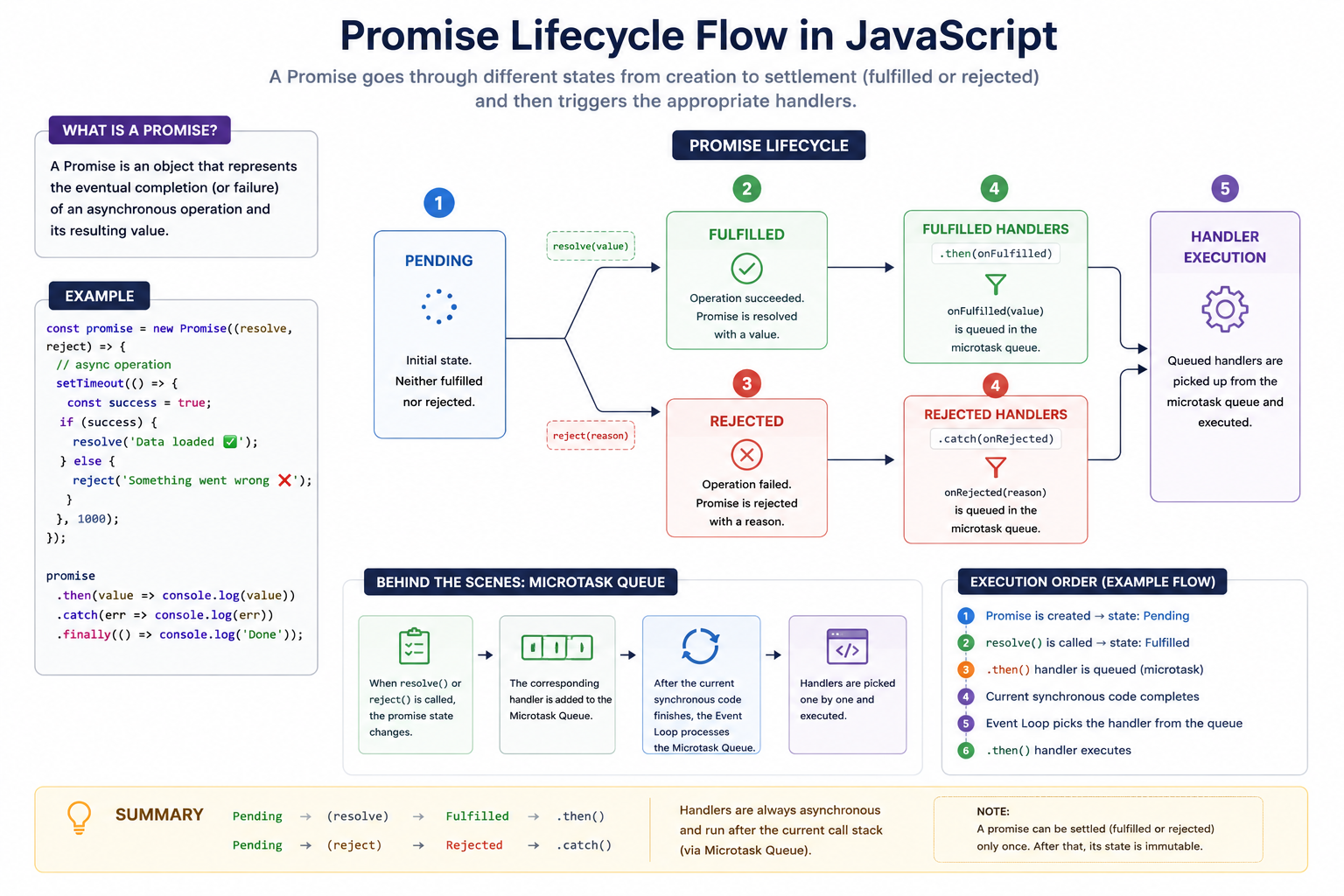
To fix the chaos of callbacks, ES6 introduced Promises. A Promise is an object that represents the eventual completion (or failure) of an asynchronous operation. Think of it as a "placeholder" for a value that hasn't arrived yet.
The Promise Lifecycle
A Promise exists in one of three states:
Pending: Initial state, neither fulfilled nor rejected.
Fulfilled (Resolved): The operation completed successfully.
Rejected: The operation failed.
Example: Refactoring File Reading to Promises
Node.js now provides a built-in promises version of most modules.
const fs = require('fs').promises;

console.log("1. Start...");

fs.readFile('config.json', 'utf8')
  .then((data) => {
    console.log("2. Content:", data);
    return "Next Task Info"; // Pass data to the next .then()
  })
  .then((info) => {
    console.log("3. Processing:", info);
  })
  .catch((err) => {
    console.error("Caught Error:", err.message);
  })
  .finally(() => {
    console.log("4. Finished.");
  });
4. Comparison: Callbacks vs. Promises
| Feature | Callbacks | Promises |
|---|---|---|
| Structure | Nested (Horizontal) | Chained (Vertical) |
| Error Handling | Manual check in every function | Centralized .catch() block |
| Readability | Poor (Callback Hell) | High (Clean and declarative) |
| Control Flow | Hard to coordinate multiple tasks | Easy with Promise.all() or Promise.race() |
| Maintenance | Difficult to refactor | Highly modular |
5. The Benefits of Modular Asynchronous Code
Non-Blocking Performance: By using Promises, you keep the Node.js event loop spinning, ensuring your server can handle other requests while waiting for a database response.
Clean Error Bubbling: In a Promise chain, an error in any step will automatically jump down to the nearest
.catch(). This prevents the "silent failures" that often happen with callbacks.Readability as Documentation: A Promise chain tells a story: "Do this, then do that, then do this final thing." It is much easier for a teammate to understand your logic at a glance.
Summary
Node.js is single-threaded, but asynchronous code makes it "concurrent."
Callbacks were the original way but led to unmanageable "Callback Hell."
Promises provide a cleaner, object-oriented way to handle future values.
State Management: Always remember that a promise starts as Pending and ends as Resolved or Rejected.
Catch Everything: Always end your promise chains with a
.catch()to ensure your application doesn't crash from unhandled rejections.


